Search This Blog

Showing posts with label Blog Tips. Show all posts

Wednesday, June 26, 2013

how to give download link to blog from Google drive

In google drive you can save any type of file and we can share this file to any one

for giving download link to blog from your drive follow this step

Step 1:

Upload file in blog which one you want give download link in blog

Step 2:

Share your file public
Right click on file -> select share -> select change-> select public -> press done


Step 3:

Copy your file number


in above example file name is 0B1b7bl-sLMYFeDd3TXN0cFhjMXM

Step 4:
use following URL for download link

https://drive.google.com/uc?export=download&id=file no

Example :-

https://drive.google.com/uc?export=download&id=0B1b7bl-sLMYFeDd3TXN0cFhjMXM


Wednesday, August 1, 2012

How to automatically update status in facebook from blog

If you want update your facebook wall and twitter account as soon as you post in blog than Register your blog to networkedblogs

networkedblogs update your blog post to your wall, page and group.

networkedblogs also tweet you post in twitter.

After Register your blog in networkedblogs than click on syndication

select blog to syndicate


Click on Add Facebook Target to select wall, page and group for automatic publishing to facebook

Click on Add Twitter Target for automatic publishing to twitter


estore
How check your post unique
How to create Website for Free
How to add related post to blog
How to add Chat room to website
Make Welcome post in blogspot
How to get connection Detail of WIFI
How to insert meta tag to websites
How to submit website search engine
How to increase PC life


Tuesday, July 31, 2012

How to check your post unique and original

if you want to check your post as unique and original or you want to check who copped your blog post to there website than click on this website copyscape

Copy URL of your blog to copyscape and click go to see result

copyscape gives you java script for protecting copy right


Related Posts :-
estore
How to create Website for Free
Make Welcome post in blogspot
How to Make Calculations in google
How to capture image form webcam in Matlab
How to connect microsoft access to Matlab
How to Zoom Screen in PC
How to install matlab 2007 on Windows7
How to connect Mysql to Matlab


How to add Related Posts to blogspot

if you want to add related post in your blog than go to this site linkwithin and register with your email and URL of your blog and click on get widget

This is simple step to get related post to your blog

linkwithin is adds free and its total free for your blog

Related Posts :-
How to create Website for Free
What is ISO File
How to add Chat room to website
Make Welcome post in blogspot
What Beep Codes indicate - Beep code error
How to get connection Detail of WIFI
How to insert meta tag to websites
How to submit website search engine

Saturday, July 21, 2012

How to make welcome or default post in blogspot

You want create post which welcomes your visitor and appears always 1st post in your blog than use this trick

Create a new post

I feel that you know how to create a new post and don`t forget to write welcome note in new post.

After creating new post, publish it on your blog
Edit post

After publish welcome post, go to edit post and click on post Options than change date to any future date like 6/27/2025.


Now again publish your welcome post and see it always appears 1st on your blog although you publish other new posts.

Related Posts :-
estore
How to create Website for Free
Matlab code for shutdown computer
How to connect Mysql to Matlab
How to use Nimbuzz chat room in PC
How to get through survey in website

Monday, April 16, 2012

How to create Tables in blog

Today in my post i will tell you how to create tables in easy way

Go to this link quackit.com

Than select number of row and number of columns you want in tables

If you want you can change Table Width, Border width and Background color

Now Click on 'Generate Table' Button

You can see Table and Code


Now copy code to your blog and change table Cell to your content of blog.

Note:-
remove this codes
<a href="http://www.quackit.com/html/html_table_tutorial.cfm" target="_top">HTML Tables</a></p>
This code is used to give link from your blog to quackit.com so remove this code to avoid link as show in below


This code is for 3 x 3 Table

<table border="1" bordercolor="#FFCC00" style="background-color:#FFFFCC" width="400" cellpadding="3" cellspacing="3">
<tr>
<td>Table Cell</td>
<td>Table Cell</td>
<td>Table Cell</td>
</tr>
<tr>
<td>Table Cell</td>
<td>Table Cell</td>
<td>Table Cell</td>
</tr>
<tr>
<td>Table Cell</td>
<td>Table Cell</td>
<td>Table Cell</td>
</tr>
</table>
<p style="font-family:verdana,arial,sans-serif;font-size:10px;">

Table Cell Table Cell Table Cell

How to Post HTML codes inside scroll box in blogspot or website

Want post HTML codes in your blog than follow any one method below

To post HTML code we use HTML encoder
There are may free online HTML encoder are available


Method 1

Past HTML code directly to post this one is simple method, before write HTML code we have to encode HTML codes

chose any following online HTML encoder

eblogtemplates
centricle
opinionatedgeek

Free HTML encode Software
HTML encoder


copy your HTML codes to encoder and click to encode button

Than copy encoded HTML codes from HTML encoder to your blog

<div style="height:120px;width:250px;font:16px/26px Georgia, Garamond, Serif;overflow:scroll;">
Your Text Here
</div>

Method 2

This method is same as method 1 we have to use HTML encoder only but here we copy HTML codes inside box in blog to look profisanal like this

box 1
<div style="width:500px;height:100px;border:1px solid #000;">Your Text Here</div>

box 2

<div style="background-color:yellow;width:500px;height:100px;border:1px solid #000">Your Text Here</div>

HTML code for box is given in Box only, Replace 'Your Text Here' to your encoded html codes

Method 3

Here also we use HTML encoder only but we copy HTML codes inside scroll box in blog it looks like this

<div style="height:120px;width:250px;font:16px/26px Georgia, Garamond, Serif;overflow:scroll;">
Your Text Here
</div>

copy above code to your blog and replace Add Your Text to your encoded HTML codes.

Don`t forget to say Thanks

Related Posts :-
How to Put Animated Header to Blog for free
How to add Chat room to website
How to insert meta tag to websites
How to submit website search engine
How to Convert a FAT Drive to NTFS Drive
How crack forgotten Windows password - Ophcrack
How to create Website for Free
estore
How to Check windows version

How to Put Animated Header to Blog for free

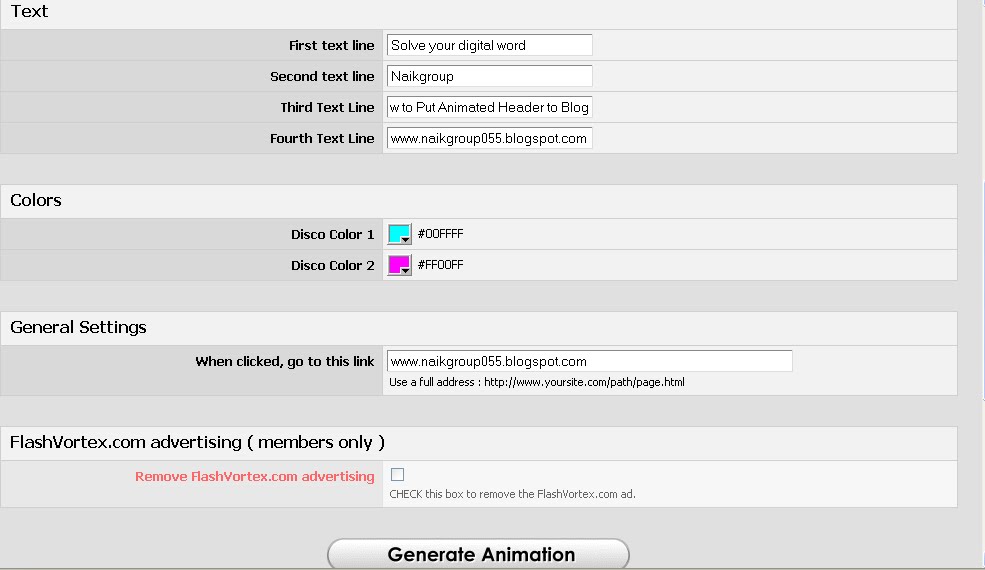
If you want put animated Header to your blog than follow this steps


Step 1
Go to this website flashvortex and select banners type you want

To get above Banner click here

Than press on 'edit this button' than Fill the following details.


Text
write text you want to display

colors
Change text color

General settings
Write your blog URL

Than click on Generate Animation Button

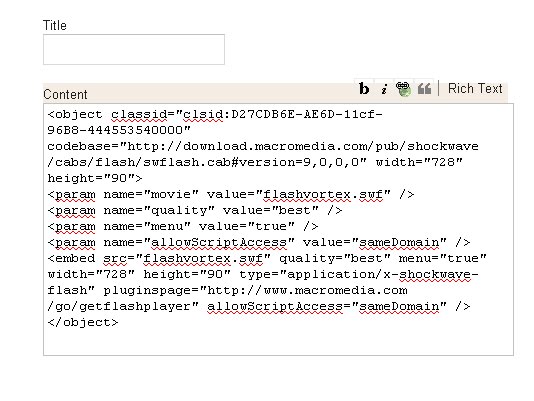
Copy the codes from advanced installation HTML code


Step 2

Now Log on to your blog

click on dashboard


click on Design Tab


Now click on to add Gadget


Select HTML/JavaScript


Copy Your code to Content


Note :- don`t write any name

Now save and view your blog

Don`t forget to say Thanks.


Related Posts :-
How to create Website for Free
How to add Chat room to website
How to insert meta tag to websites
How to get connection Detail of WIFI
How to submit website search engine
How to increase PC life
how to run m file in gui using matlab
Matlab code for shutdown computer
estore


Saturday, March 24, 2012

How to add visitor counter in blogspot

Visitor counter gives number of blog visitors
there are may website will provide free counter for blog

Following website will provide counter for free


hitwebcounter


free-counters

24counter

flagcounter

sitemeter

now copy code from above website

step 1
log in your blog

step 2
click on Dashboard -> Design

step 3
click on 'add gadget'
one pop window will open

step 4
select 'HTML/JavaScript Add '

past your codes here and give suitable name

step 5

click on Save

Now you can count blog visitors

Friday, July 29, 2011

How add chat room in blog

Today in my post will tell you how to add chat room to your blog for free

you can use chart room within your friends and office.


just go to www.99chats.com and signup for free

copy code any one from below


than follow this step to add chat room

1.sign in your blog
2.click on design
3.add a gadget
4.chose HTML/javacript


5.put title and copy code in content
6.press save

now you can use your own chat room.

you can see online users in your chat room and also can create one more chat room in different names


Thursday, July 28, 2011

How to insert Meta Tags in Blog for free

Meta Tags are normally use to increase your blog’s visibility to Search Engines. Adding it in proper manner will help you to increase the chances of getting a higher SERP in Search Engine War. and get more traffic to your blog


Login to you blogger account -> go to the dashboard of the blog ->
Now click on the Edit HTML tab -> At the html codes, add your Meta tag lines anywhere in between < head > and < / head >


To get your mega tags for free click here


How to submit website to search engine

Today i tell you how to submit your website URL to search engine like google, yahoo, bing, ask ...

i will give you list of link to submit URL to Search engine

Google

To add your website URL to google clik here

Put your URL and write Comments to help google to distinguish between sites submitted
by individuals and just write wold given below and press add URL

Yahoo

To submit your URL to yahoo click Here

in yahoo you can submit mobile website too

Bing

To submit in Bing click here

just write Characters given in box and put URL oly this much

Rediff

just click here to submit your site to rediff

you have to submit your mail id also


AOL

AOL uses google for its organic search and you can get on it by submitting your site to google


ALL in one place
Submit Express
Not have time to submit URL to individually than click here

Submit Express can register your website URL with 70+ search engines and directories, all for free so enjoy
but you have to confirm each site in your email id

addme
get free submit service submits your URL's to the top 20 search engines and directory.

bblmedia
you want to submit individually but want all search engine in one place than click here

bblmedia list all free and pay search engine


submitstart


here you can submit unlimited website to search engine for free

Tuesday, July 26, 2011

How to verify Technorati Claim Token in your blog

Many bloggers are unaware of how to verify their technorati claim token. This post will attempt to answer how you can claim and verify your blog on Technorati using the unique code they generate for your blog.

For instance, Technorati assigned claim token number for Naikgroup is 9NT5ZFW4DRJW

All you have to do is to put your unique token number in a new post and publish it. You could place the code anywhere in the post (generally it is preferred to keep within the first few lines or within excerpt). You can even make a new post, something like Technorati claim or Technorati verification and placing just the claim token code as content in the post. It does not have to be in Title even. Once you have published the post with the token in it, visit http://technorati.com/account/.

Sign in to your Technorati account. Under your profile page, you should notice Technorati cliam status and a button to verify claim token. Click on ‘verify claim token’ and Technorati will go and look for unque code in your blog. If all goes well, Technorati will visit your blog, find the token and verify it.

You may sometimes get an error message with Technorati mentioning that “we have encountered a problem reading your site’s data.” If that occurs, make sure your claim code is correct and is reflected in your blog’s RSS feed. For blogs, having feed excerpts enabled, make sure the code appears in excerpt.